
Sonoff SNZB-02DR2 Remote Display with Home Assistant
So you bought yourself some cool tech like the Sonoff SNZB-02DR that supports a remote temperature display and thought you could use that with home assistant? Wrong; well, sort of.
See the SNZB-02DR can be configured to display another device’s temperatures on it as an “External” sensor. But this functionality only works on official Sonoff hub with their software. They use custom Zigbee clusters and attributes that are not common and publicly known
The cluster and attributes
With some reverse engineering and the perseverance of people on the internet, it has been discovered what the cluster and attributes are.
The cluster in question is 0xFC11. On this cluster there are 3 attributes of interest that can be written too
0x600Eto toggle external display enabled (1) or disabled (0)0x600Dfor external temperature0x6018for external humidity
Zigbee2MQTT and HomeAssistant
In this setup I am using Zigbee2MQTT and HomeAssistant to drive the automation. It’s important to upgrade your SNZB-02D to firmware 1.0.4 from Zigbee2MQTT ota updates.
While using the devtools from Zigbee2MQTT you can test if your display is working as expected by directly writing to the attributes.
On my setup my Sonoff device is called “Office Temperature”. In the examples below replace every reference you see for it with the name you have to your device.
Toggle external display
Setting the value to 1 will enable it, set to 0 to disable
{
  "write": {
    "cluster": 64529,
    "payload": {
      "24590": { "value": 1, "type": 32 }
    }
  }
}
Update temperature
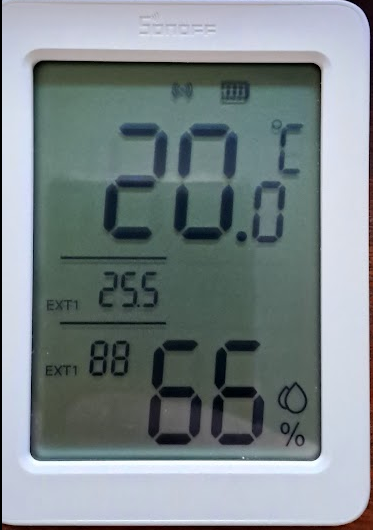
The temperature is as x100 the value. For example if you want to send 25.5, you will send 2550
{
  "write": {
    "cluster": 64529,
    "payload": {
      "24589": { "value": 2550, "type": 41 }
    }
  }
}
Update humidity
The humidity is sent as x100. E.g if you want to send 88%, you will send 8800
{
  "write": {
    "cluster": 64529,
    "payload": {
      "24600": { "value": 8800, "type": 33 }
    }
  }
}
Now you should see some values on your device
Let’s automate it
Ideally these attributes should be exposed and writable by Zigbee2Mqtt which would make automation a whole lot easier… But, for now, this works. Basically create an automation that triggers when the sensor you are interested in changes. I made 2 automations for my outside temperate sensor to create the classic inside/outside temperature setup. One for the humidity, and one for the temperature, but you can really use any sensor in home assistant, it doesn’t have to be Sonoff or even Zigbee.
I enabled external display by calling it once from the zigbee2mqtt developer tools, but you could probably include it in your automation, depending how you want to use it….
Create an automation with:
When: The sensor you are “watching” for updates. My sensor is 0xa4c138018e4effff for my SNZB-02WD that’s outside
Then: MQTT: Publish
Topic: zigbee2mqtt/Temperature Office/set
For Humidity
Payload:
{
  "write": {
    "cluster": 64529,
    "payload": {
      "24600": { "value": {{ (states('sensor.0xa4c138018e4effff_humidity') | float * 100) | round(0) }}, "type": 33 }
    }
  }
}
For Temperature
Payload:
{
  "write": {
    "cluster": 64529,
    "payload": {
      "24589": { "value": {{ (states('sensor.0xa4c138018e4effff_temperature') | float * 100) | round(0) }}, "type": 41 }
    }
  }
}
Now each time the temperature or humidity changes, the display will update too
